
Meta Title: How to Download GTA 6 Legally – Complete Guide for PC, PS5 & Xbox (2026)
Meta Description: Learn how to download GTA 6 legally on PC, PlayStation 5, and Xbox Series X|S. Discover official stores, installation steps, storage requirements, preload information, and safety tips.
How to Download GTA 6 Legally (Complete Guide for PC, PS5 & Xbox)
Grand Theft Auto VI (GTA 6) is one of the most anticipated video games ever created. Millions of players around the world are eager to explore Rockstar Games’ newest open-world adventure set in the vibrant state of Leonida, featuring a modern version of Vice City.
If you’re wondering how to download GTA 6 safely and legally, this guide covers everything you need to know. From choosing the right platform to installing the game and avoiding fake download websites, you’ll find all the essential information here.
Why You Should Download GTA 6 Legally
Downloading GTA 6 from official platforms ensures you receive the complete game, future updates, security patches, online features, and customer support.
Benefits of downloading legally include:
- Official game updates
- Access to online multiplayer features (when available)
- No malware or viruses
- Better game performance
- Secure payment methods
- Reliable customer support
- Automatic bug fixes and patches
Illegal downloads often contain harmful software, incomplete files, or modified versions that may not work properly.
Official Platforms to Download GTA 6
Rockstar Games distributes its games through trusted digital stores.
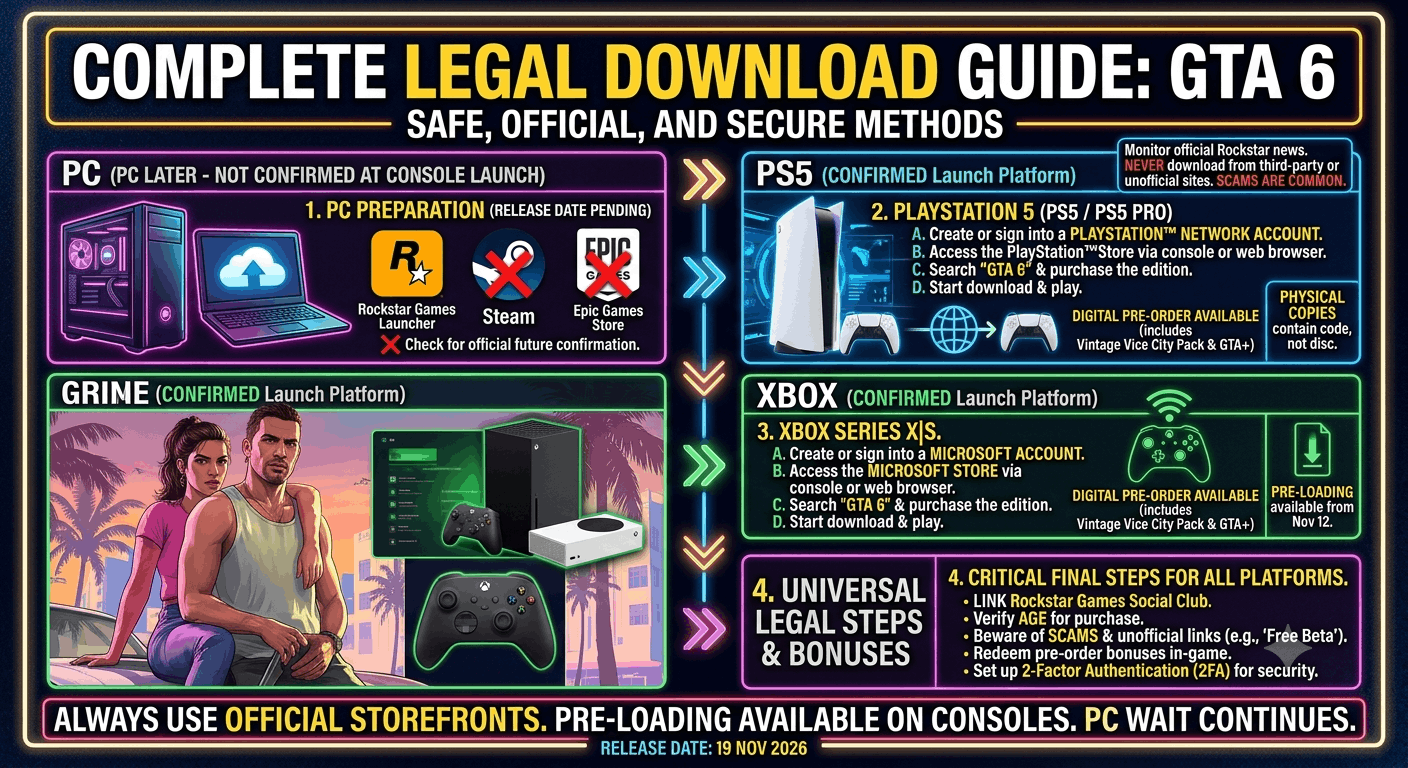
For PlayStation 5
Players on PS5 can purchase and download GTA 6 directly from the PlayStation Store.
Steps:
- Turn on your PlayStation 5.
- Open the PlayStation Store.
- Search for “Grand Theft Auto VI.”
- Purchase the game.
- Select Download.
- Wait for installation to complete.
- Launch and enjoy.
For Xbox Series X|S
Xbox players can install GTA 6 using the Microsoft Store.
Steps:
- Open the Microsoft Store.
- Search for GTA 6.
- Purchase the game.
- Start the download.
- Install all updates.
- Launch the game.
For PC
When GTA 6 becomes available for PC, it is expected to be offered through official digital storefronts.
Potential platforms include:
- Rockstar Games Launcher
- Steam
- Epic Games Store
The exact PC release schedule and supported stores depend on Rockstar Games’ official announcements.
How Much Storage Space Will GTA 6 Need?
Although Rockstar has not published final installation requirements, modern AAA open-world games typically require significant storage.
Players should ensure they have enough free SSD space before installing the game. Additional storage may also be needed for updates and downloadable content.
Internet Requirements
A stable internet connection is recommended for:
- Downloading the game
- Installing updates
- Accessing online features
- Cloud saves (where supported)
A faster connection will reduce download time.
Can You Preload GTA 6?
Many major game releases allow players to preload the game before launch.
If GTA 6 supports preloading on your platform:
- Purchase the game in advance.
- The download becomes available before release.
- The game unlocks automatically at launch time.
Preloading helps players start playing immediately after release without waiting for a large download.
Step-by-Step Installation Guide
After downloading GTA 6:
- Verify enough storage is available.
- Begin installation.
- Install any required updates.
- Restart the system if prompted.
- Launch the game.
- Adjust graphics and gameplay settings.
- Start your adventure.
Avoid Fake GTA 6 Download Websites
As excitement grows, many fake websites claim to offer free GTA 6 downloads.
Be cautious of websites that promise:
- Free full versions
- Unlimited money hacks
- No purchase required
- Cracked editions
- Early access downloads without authorization
These sites may expose your device to malware, phishing, or other security risks.
Is GTA 6 Free?
No. GTA 6 is a premium game that must be purchased through authorized retailers or digital storefronts. Any website claiming to offer the complete game for free should be treated with caution.
Tips for a Smooth Download Experience
Before downloading:
- Check your available storage.
- Keep your console or PC updated.
- Use a stable internet connection.
- Close unnecessary background downloads.
- Avoid interrupting the installation process.
These simple steps can help reduce installation issues.
Frequently Asked Questions
Can I download GTA 6 on PC?
A PC version is expected, but availability depends on Rockstar Games’ official release plans.
Can I play GTA 6 offline?
Single-player availability and offline functionality depend on the game’s platform requirements and activation process.
Is GTA 6 available on PlayStation 4 or Xbox One?
Support depends on Rockstar Games’ officially announced platforms. Always check the latest official information before purchasing.
Is it safe to download GTA 6 from unofficial websites?
No. Downloading games from unofficial sources can expose your device to security risks and may violate copyright laws.
Can I transfer my progress between platforms?
Cross-platform progression, if available, will depend on Rockstar Games’ supported features.
Final Thoughts
Downloading GTA 6 legally is the safest and most reliable way to enjoy one of the biggest game releases in recent years. By purchasing the game through official platforms, you’ll receive the complete experience, ongoing updates, and access to supported online features while avoiding the risks associated with unofficial downloads.
Whether you plan to play on PlayStation 5, Xbox Series X|S, or PC (when available), following official installation methods ensures a smooth start to your journey in Leonida and Vice City.
Stay tuned to Rockstar Games’ official announcements for the latest information about release dates, supported platforms, and download availability.
Related GTA 6 Guides
- GTA 6 Map Guide: Every Confirmed Location
- GTA 6 Wildlife Guide: Every Confirmed Animal
- GTA 6 Vehicles Guide: Every Confirmed Car, Bike, Boat & Aircraft
- GTA 6 Police System Explained
- GTA 6 Graphics Comparison: GTA 5 vs GTA 6
- GTA 6 Character Relationship Explained: Jason & Lucia
- GTA 6 Safehouses Guide
- GTA 6 Side Activities: Everything Confirmed So Far
- GTA 6 Easter Eggs: Official References Explained
- GTA 6 Best Cars Seen in the Official Trailer